
Language:

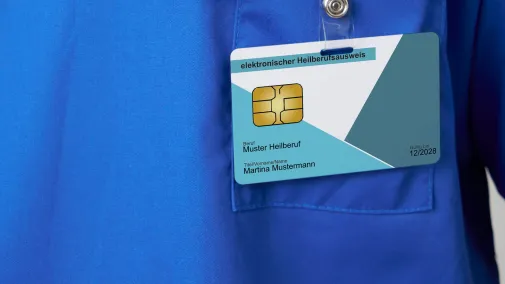
Doctor holding smc-b card

How to apply for your SMC-B and SMC-B ORG: a step-by-step guide

The Practice and Institutional ID Card SMC-B or SMC-B ORG provides access to the Telematics Infrastructure (TI). The card enables healthcare organisations to authenticate themselves within the TI. This guide explains how to obtain your SMC-B / SMC-B ORG quickly and smoothly. We take you through the application and ordering process step by step.

Your SMC-B / SMC-B ORG in five steps

Step 1: Submit an application

Submit an initial application (if required) 

For many sectors, an initial application to the responsible card issuing authority is required before ordering. 


To step 1


Step 2: Application in the D-Trust portal

Order your card 

Via the D-Trust E-Health Application Portal 


To step 2


Step 3: Identify yourself personally

Verify your identity

Identification can be completed online (eID), at a local post office, or, where applicable, through D-Trust or authorised staff within your institution. 


To step 3


Step 4: Receive eHPC/ePC

Approval and dispatch 

Following verification of your application, the card is produced and dispatched. 


To step 4


Step 5: Activate eHPC/ePC

Unlock and activate your SMC-B

Unlock and activate the card using your PIN. 


To step 5


Step 6: Use telematics infrastructure

Use the SMC-B 

Authentication within the Telematics Infrastructure (TI).

Example process

Depending on the card issuing authority, individual steps may differ slightly from this description. This guide therefore outlines a typical process for ordering an SMC-B or SMC-B ORG.

Your path to the SMC-B

Doctor typing on laptop and writing on notepad.

Step 1: Submitting your application

In certain sectors, an initial application to the relevant card issuing authority is required before ordering an SMC-B or SMC-B ORG.

Card issuers by professional group

The responsible issuer for the SMC-B / SMC-B ORG varies depending on the type of institution. Below is an overview of where to initiate your order – either directly via the D-Trust E-Health Application Portal or through the relevant card issuer. 

Medical and Psychotherapy Practices: 

Doctors and psychotherapists can generally order their electronic practice ID directly via the D-Trust E-Health Application Portal: www.d-trust.net/antragsportal

Dental practices: Dental practices register via the portal of their respective Association of Statutory Health Insurance Dentists (KZV). From there, they are redirected to the D-Trust E-Health Application Portal. Pre-completed applications are provided by the responsible KZV. 

Hospitals / private clinics: Applicants from hospitals and private clinics can order their SMC-B directly via the D-Trust E-Health Application Portal: www.d-trust.net/antragsportal 

The applicant must be a person authorised to represent the institution (hospital, private medical practice). Proof of authorisation must be provided in a form appropriate to the institution’s legal structure. 

Pharmacies: Pharmacies apply for their SMC-B via their respective Chamber of Pharmacists. They can then order the card via the D-Trust E-Health Application Portal: www.d-trust.net/antragsportal 

Nursing, midwifery, physiotherapy, occupational therapy, speech and language therapy, podiatry and nutritional therapy institutions:

Applicants from nursing, midwifery, physiotherapy, occupational therapy, speech and language therapy, podiatry and nutritional therapy institutions log in to the electronic Healthcare Professionals Register (eGBR). Using the transaction number received, they can then order their SMC-B via the D-Trust E-Health Application Portal: www.d-trust.net/antragsportal 

Providers of medical aids: 

Applicants from optical, hearing aid, orthopaedic technology, shoemaking and dental laboratory businesses must register with their competent Chamber of Crafts. Using their transaction number, they can then order their SMC-B via the D-Trust E-Health Application Portal: www.d-trust.net/antragsportal 

Manufacturers/providers of digital health applications (DiGA): Manufacturers and providers of digital health applications may order their SMC-B directly via the D-Trust E-Health Application Portal: www.d-trust.net/antragsportal 

Private health insurance providers (PKV): Private health insurers may order their SMC-B directly via the D-Trust E-Health Application Portal for use within the Telematics Infrastructure: www.d-trust.net/antragsportal 

Ambulatory Care Sector: Applicants from the outpatient sector can order their electronic practice card directly in the D-Trust E-Health Application Portal: www.d-trust.net/antragsportal

The applicant must be the owner or co-owner of the practice. Applicants in the ambulatory sector include: 

  • Emergency outpatient departments 
  • Hospital outpatient clinics with statutory health insurance billing 
  • Authorised physicians 
  • Attending physicians 
  • Medical care centres (MVZ) 

When applying, please select “Practice ID card for a medical practice”. Applications in the ambulatory sector are reviewed and approved by the responsible Association of Statutory Health Insurance Physicians (KV) as the card issuer. 

Other healthcare organisations (SMC-B ORG): 

Applicants from other healthcare organisations may order their SMC-B ORG directly via the D-Trust E-Health Application Portal: www.d-trust.net/antragsportal

Laptop with the e-health application portal open

Step 2: How to use the E-Health Application Portal

Order your Practice and Institutional ID Card SMC-B or SMC-B ORG in just a few steps via the D-Trust E-Health Application Portal. This video explains the ordering process.

Important information on ordering

In certain sectors, the SMC-B can only be ordered by individuals who hold an electronic Health Professional card (eHPC).

Starting a new application

You can order your SMC-B / SMC-B ORG in our E-Health Application Portal. Under “Institution Card (SMC-B)”, click on “Start a new application”.

Start with a blank or pre-completed application

On the next page, two options are shown:

1. Starting with a blank application 

Select this option if you have received a transaction number from your card issuer.

2. Starting with a pre-filled application 

Select this option if you have a transaction number from your card issuer.

On the following pages, complete the fields relevant to you. 

Identification, application submission and status tracking

Personal identity verification is part of the ordering process (see step 3 below). Once all required information has been completed, the application is submitted digitally. Please save your application details securely, including your transaction number and password. You will need both to view your application in the portal, check its status or make changes if required.

Doctor looks at laptop and smiles.

Step 3: Verifying your identity

Anyone applying for an SMC-B or an SMC-ORG must complete a personal identity check. Two options are available: 

  1. identity.tm 
  2. PostIdent

Graphic illustration of email encryption

identity.tm 

Select this method if you have already been identified in advance by staff from Bundesdruckerei/D-Trust, by our service provider CGM (CGM EASY Ident), or by an appropriately trained member of staff at your company.

Pictogram Person ID card

PostIdent 

You will receive a personalised link directing you to the Deutsche Post website. There you can choose between two methods: 

  • Classic PostIdent, which is carried out at a Deutsche Post branch of your choice, or 
  • online identification using the eID function of your ID card, conveniently from home
Letter is inserted into the letterbox.

Step 4: Your SMC-B / SMC-B ORG is sent by post

Once the application has been completed in full and identification has also been successfully completed, D-Trust obtains final approval from your responsible card issuer to produce the SMC-B / SMC-B ORG. D-Trust then produces and dispatches it.

Delivery time 

Processing time depends on current demand. You will normally receive your card within around two weeks once the order has been fully submitted: after the application has been received online, identification has been completed successfully and the card issuer has granted approval. A further letter containing the PIN and PUK is usually sent three days after the card is dispatched, by registered mail, to the address provided in the application.

Doctor writing at her desk

Step 5: Unlocking and activating your card

To use the SMC-B / SMC-B ORG within the Telematics Infrastructure (TI), the certificates must first be unlocked in the E-Health Application Portal under “View my applications”. The card must then be activated.

The smartcard contains a microchip that looks similar to a SIM card. This chip is removed and permanently installed in the card terminal and sealed. 

Commissioning takes place in two steps: 

1. Certificate activation 

To unlock your SMC-B / SMC-B ORG, you will need your transaction number and password (as saved during your application). Unlocking takes place in the D-Trust E-Health Application Portal under “View my applications”. By unlocking the card in the D-Trust E-Health Application Portal, you confirm that you have received it. 

2. Card activation 

The card must then be activated via the card terminal. Only after this activation is your SMC-B / SMC-B ORG ready for use in the TI. You will need the five-digit PIN from the PIN/PUK letter. Entering the PIN activates the SMC-B.

Pricing and product overview for the SMC-B

Product description
Price in EUR*

SMC-B

SMC-B for doctors, dentists and psychotherapists
390,76 €
  • The costs for the practice card are partly covered by the TI operating cost allowance under the relevant financing agreement. 
  • Valid for 5 years

* Prices in euros (€), plus statutory VAT.

Product description
Price in EUR*

Electronic Institutional ID Card (SMC-B)

for nursing, midwifery, physiotherapy, occupational therapy, speech and language therapy, podiatry and nutritional therapy institutions
390,76 €
  • The costs for the Institutional ID Card are partly covered by the TI operating cost allowance under the relevant financing agreement. 
  • Valid for 5 years

* Prices in euros (€), plus statutory VAT.

Product description
Price in EUR*

Electronic Institutional ID Card (SMC-B)

for pharmacies
378,00 €
  • The costs for the Institutional ID Card are partly covered by the TI operating cost allowance under the relevant financing agreement. 
  • Valid for 5 years

* Prices in euros (€), plus statutory VAT.

Product description
Price in EUR*

Electronic business card (SMC-B)

for opticians, hearing aid acousticians, orthopaedic technology, cobbler and dental technology businesses
390,76 €
  • The costs for the business card are partly covered by the TI operating cost allowance under the relevant financing agreement. 
  • Valid for 5 years

* Prices in euros (€), plus statutory VAT.

Frequently asked questions about applying for an SMC-B

Digitalisation is changing many processes in the healthcare sector. This naturally raises questions. Some of the most frequently asked questions about applying for and ordering the SMC-B and SMC-B ORG are answered here.

Reimbursement for the SMC-B is provided via the TI lump-sum allowance applicable to the respective sector and is already included therein. An overview of the funding arrangements is provided by the National Association of Statutory Health Insurance Funds (GKV-Spitzenverband).

Only one SMC-B is required per site. This applies regardless of how many stationary card terminals are in use. If the site has a very large number of mobile card terminals and IT has integrated the SMC-Bs via these card terminals, several SMC-Bs are required. As a rule, your IT service provider will consider this.

The SMC-B is valid for a maximum of five years and must be replaced before expiry. D-Trust will notify you in good time before expiry.

The card is sent by recorded mail directly to the address specified in the application.

For security reasons, the SMC-B is valid for a maximum of five years.

The PIN letter is sent three days after the card is dispatched by registered mail to the address provided in the application.

D-Trust is legally required to verify the identity of applicants. This applies to both first-time and renewal applications. We can offer you the following options for this purpose: 

  • Deutsche Post identification service (PostIdent): You will receive a personalised link directing you to the Deutsche Post website. There you can choose between two methods: the classic PostIdent procedure, which is carried out at a Deutsche Post branch, or online identification using the eID function of your ID card, conveniently from home. 
  • On-site identification by qualified staff of the trust service provider D-Trust, its partners (for example CGM Easy Ident), or by your organisation’s in-house staff who have been trained and authorised in advance:Identification takes place on your premises or at a central event. All you need is a valid ID document and a mobile phone. The advantage of this is that you are identified on site and do not have to go to the post office. 

Please note that for identification you must use the ID document that you also specify in the application.

To make access to the Telematics Infrastructure (TI) as easy as possible for CompuGroup Medical (CGM) customers, D-Trust works together with CGM. Only CGM customers receive a ten-digit order code, which is entered in the D-Trust E-Health Application Portal. This ensures that the CGM-certified technical specialist responsible for connecting the practice to the TI can monitor the application status up to delivery and take this into account when scheduling the installation of the TI components. Entering the order code is optional and only relevant for CGM customers.

Do you have questions about the SMC-B? Contact us:

Piktogramm für Support
D-Trust Support-Team

+49 (0)30 2598 - 4050

Where the SMC-B is used